Expense and Income Receipts
Expense and Income Receipts include cash expenditures made from the cash register, expenses made outside the regular expenses of businesses in the normal process, small receipts, invoices (electricity, water, natural gas, etc.), personnel needs expenses, rental invoice, car rental invoice, etc. Companies register all these income and expense invoices using the "Expense and Income Receipts" registration screen.
Way: ERP > Finance Accounting > Expense and Income Transactions > Expense and Income Vouchers
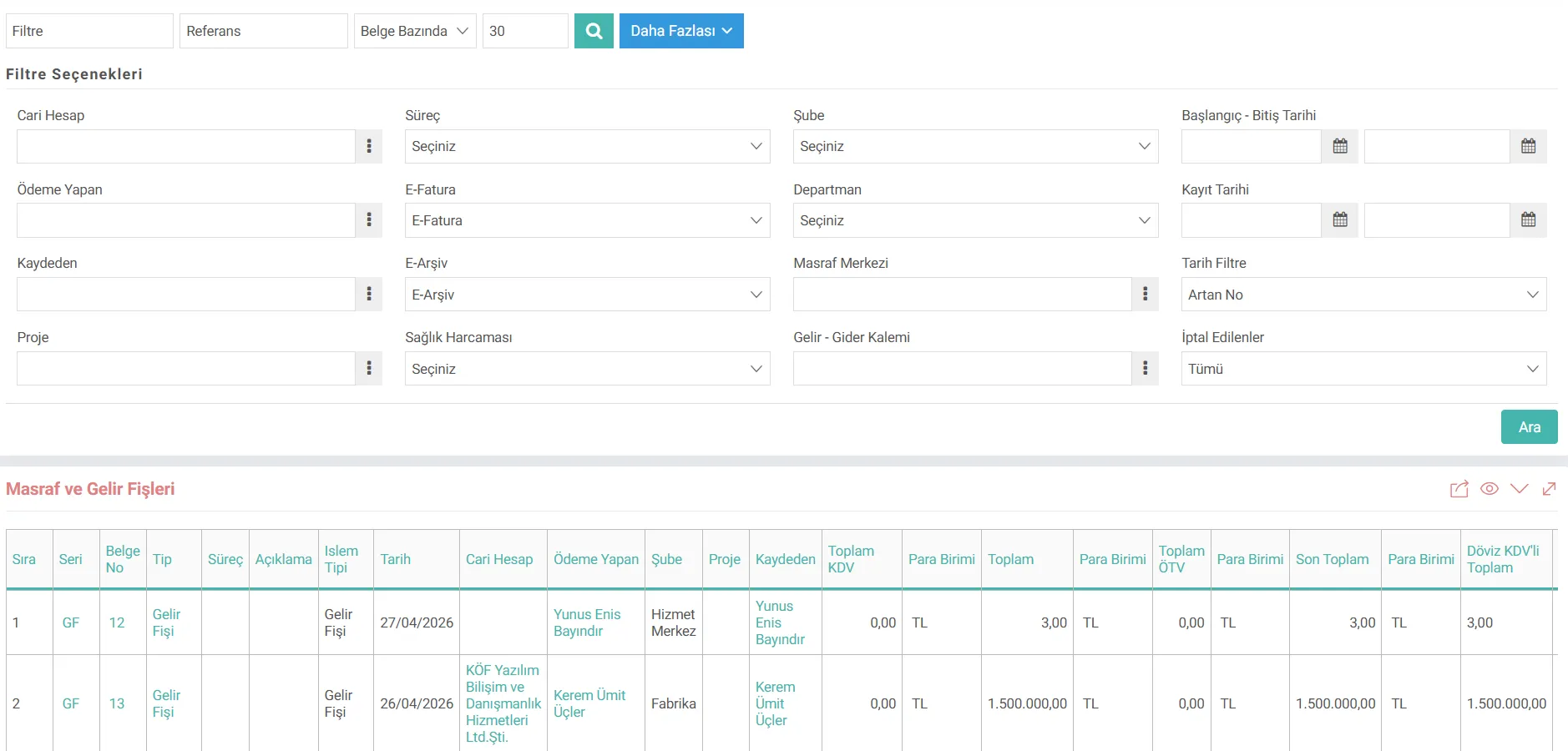
Expense and Income Vouchers Listing
Expense and income transactions work directly with the budget system. To create Expense Voucher and Income Voucher, first cost centers, income/expense centers, budget categories and budget items must be defined. With the "Page Settings" function on the page, the Expense and Income Receipts that need to be made on this page are displayed with the details of XML Setup, Processes, Settings, Output Templates.
After all definitions are made, expense, income and maintenance receipts are recorded in the system. After the relevant records are created, the Expense and Income Vouchers are displayed via the listing business function. Detailed filter options are displayed with the More button on the list page.
Page Designer & Page Settings
The locations of filters and columns on the page can be changed, removed or made mandatory with the "Page Designer" function. Additionally, the "xml" settings under Page Settings allow editing of the display of these fields. You can check these settings before you start using them and change them depending on your usage.
- Show the registrant information
When Yes is selected, it ensures that the registrant part appears on the listing page as selectable for the employees. - Let the transaction currency appear
When Yes is selected, Total and Transaction with Foreign Currency VAT are added to the columns on the screen we have listed. Currency columns are also added. - Let the Project column appear
When Yes is selected, the "Project" column is added to the columns on the screen we have listed and the project selected in the document is displayed in this column. - Branch column appears
When Yes is selected, the "Branch" column is added to the columns on the screen we have listed and the branch selected in the document is in this column. - The Total SCT field appears.
When Yes is selected, the "Total SCT" column is added to the columns on the screen we have listed and the total SCT amount in the document is displayed in this column. - The Payer field appears.
When Yes is selected, the "Payer" column is added to the columns on the screen we have listed and the person making the payment in the document is displayed in this column. - Show the process?
If yes, processes will be shown on the page. - Show health expenditure in the filter?
If yes, the filter will show whether health expenditure has been created or not.

Kaydedilen belgelerin çıktılarının alınması için kullanılır. Standart şablonlar seçilebilir ya da özel şablonlar eklenebilir, ayrıca şablonlar yetkiye bağlanabilir.
x_is_record_emp Kaydeden Bilgisi Görünsün
x_transaction_currency İşlem Dövizi Görünsün
x_project_info Proje Sütunu Görünsün
x_branch_info Şube Sütunu Görünsün
x_total_otv Toplam ÖTV Alanı Gelsin
x_paying_emp Ödeme Yapan Alanı Gelsin
xml_show_process_stage Süreç Gösterilsin mi?
x_is_health_expense Filtrede Sağlık Harcaması Gösterilsin mi?
Feedback
2.1.10.5. Expense Claims
Personnel create spending requests for their expenditures and expenses using the spending requests screen on the HR-Transactions page on the Self-Service services screen. Saved expense requests are listed on the Expense Requests screen.
2.1.10.4. Expenses and Revenues
It is important for businesses to keep their costs under control, monitor revenues in real time and monitor the income-expense balance.
Expense and Income Transactions
In W3, expense and income records are recorded using Expense and Income Vouchers. Expenses and incomes are sized with these slips, which are extremely simple to use. In this way, it is aimed to look at expenditures and incomes from every angle.