QPIC - RS (Processes)
QPIC - RS matrix provides mapping of business functions and flow. The real map of the company is created with the matrix containing the words Quality, Process, Information, Communication, Roles, Stage in its name. It is the screen that organizes workflows in Workcube and allocates functions to users according to authority and responsibilities. It regulates process transitions between modules and functions. All processes are listed. Almost all features in the process detail appear in this list. The stages can be controlled from this screen without going into process details.
Path: Control Panel > BPM > QPIC-RS
OPIC-RS
Quality, Process, Information, Communication, Roles, Stage (Stage)
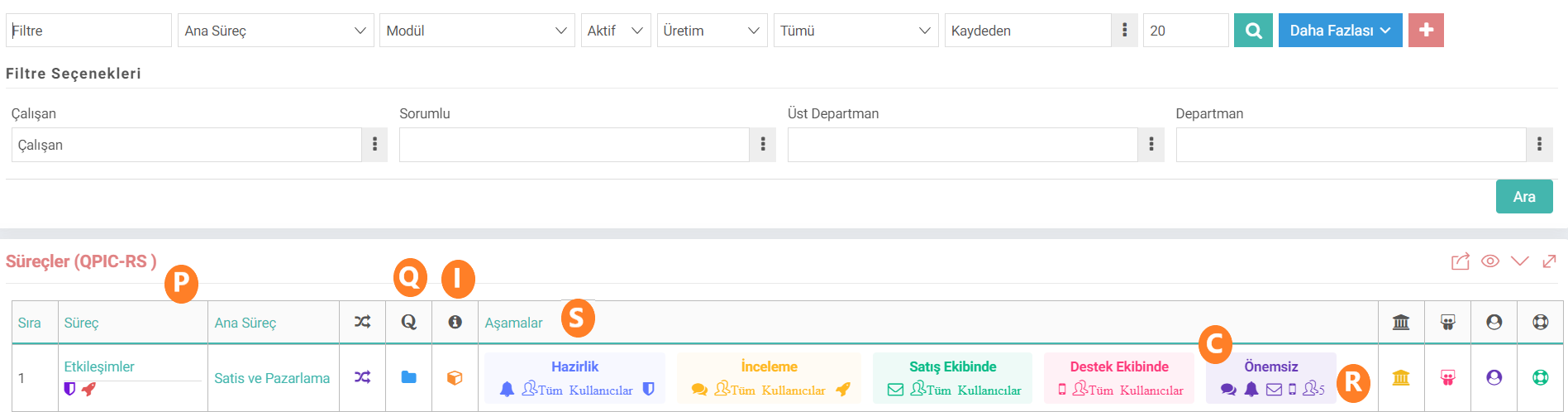
- Q: Quality - Details such as what this process is and what operations it performs are entered as a quality standard by creating content. You can add content from Content Management and associate it within the process, or it can be added directly with the + button in the process detail.

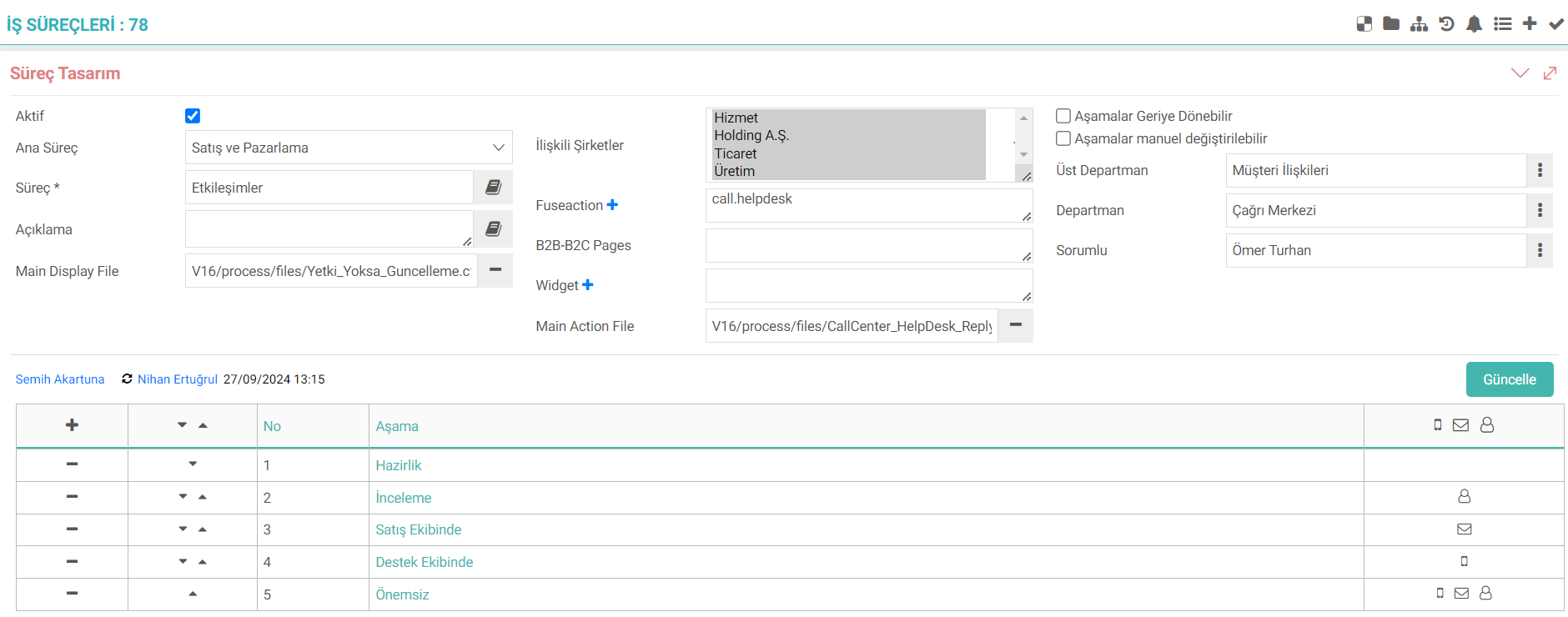
- P: Process - From process management come the processes created. When clicked, you can go directly to the process detail and make any desired changes on the screen.
- I: Information - Related WOs (Workcube Objects) appear in the Information column. These WOs are fuseactions defined in the process detail.

- C: Communication - Communication indicates how and in what way the stages in the process are notified. These arrangements are made in the Communication field in the stage detail.
.png) 1.When the ChatFlow box is checked, the chat icon appears. A notification will be sent to the online message screen. When the
1.When the ChatFlow box is checked, the chat icon appears. A notification will be sent to the online message screen. When the
2.Workflow box is checked, the bell icon appears. It is displayed on the Approval and Warnings page and allows actions to be taken depending on the adjustments made during the stage.
3.If the Email box is checked, the e-mail icon appears. A notification is sent to the e-mail address defined in the employee details.
4. If the All Users box is checked, all users will be displayed. If it is not checked, only the number of selected users will be displayed if the person selection is made in the maker field.
- R: Roles - These are the roles within the stage. If all users are not checked and a selection is made in the maker field, the number of users is displayed here. Details within the stage are displayed.
- S: Stage - The stages of the process come. Icons appear depending on the choices made during these stages. Without going into detail, the operations performed by a stage can be viewed directly from the list page.
Apart from OPIC-RS, other details about the process and stages are also available on the page.

- DF - Display File: Mandatory controls or interventions regarding any area on the screen may include warnings, blocks, etc. It is done with Display File. If it is added to the main process, that is, if it will be valid at all stages, it will be Main Display File and the icon will appear under the process. If it is added in stage detail, that is, if only the added stage will also run, it will be Display File and an icon will appear next to the stage.
- AF - Action File: Mail sending, update operations, etc. It is done with Action File. If it is added to the main process, that is, if it will be valid at all stages, it will be Main Action File and the icon will appear under the process. If it is added in the stage detail, that is, if only the added stage will also run, it will be Action File and an icon will appear next to the stage.
- W - Workflow Designer: If workflow designs have been made in the process detail, they will be displayed in this area.
- Parent Department: If the parent department is selected in the process detail, the icon will appear and the selected parent department will appear. is displayed.
- Department: If the department is selected in the process detail, the icon appears and the selected department is displayed.
- Responsible: If the superior responsible is selected in the process detail, the icon appears and the selected responsible person is displayed.
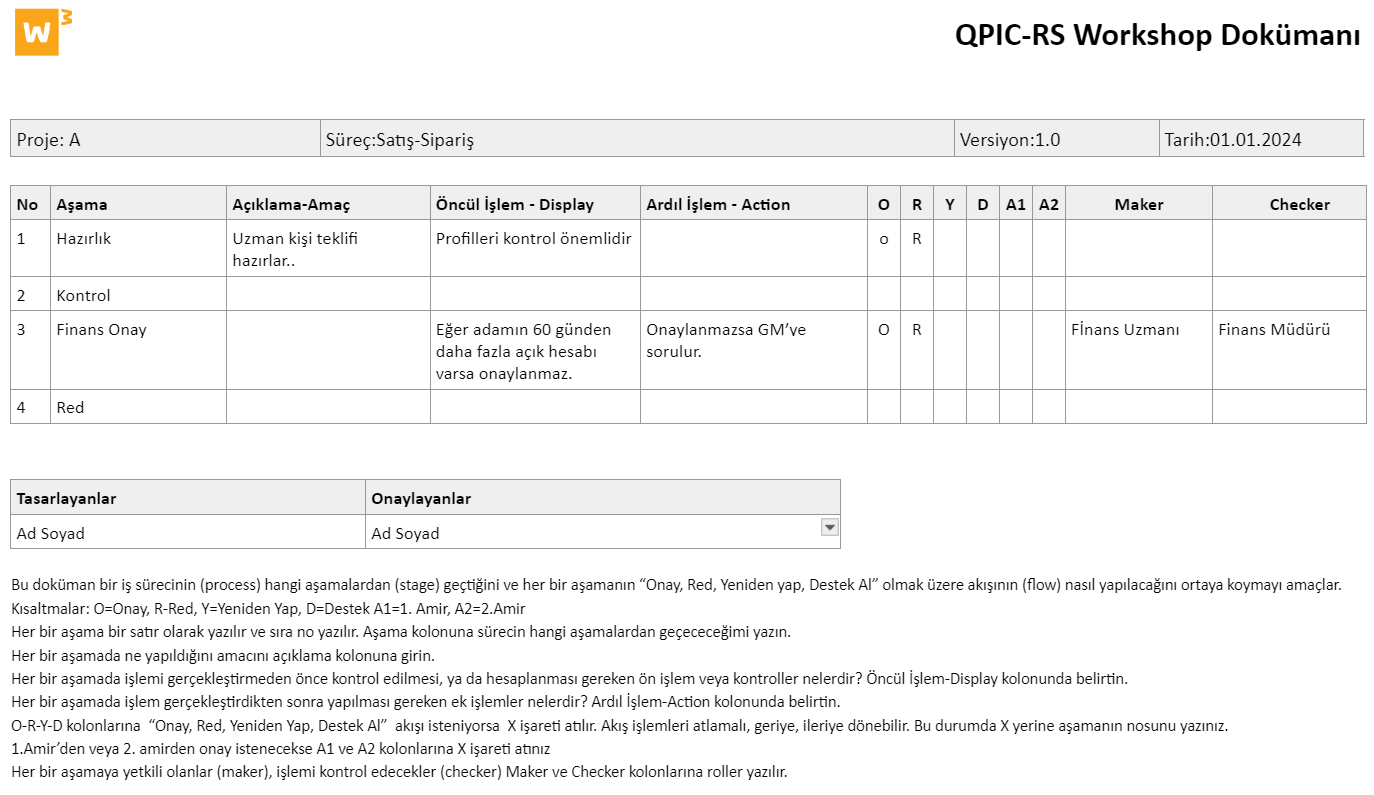
QPIC-RS With the document, processes and stages can be planned by editing on the document before being implemented in Workcube.