نتائج صيانة الخدمة
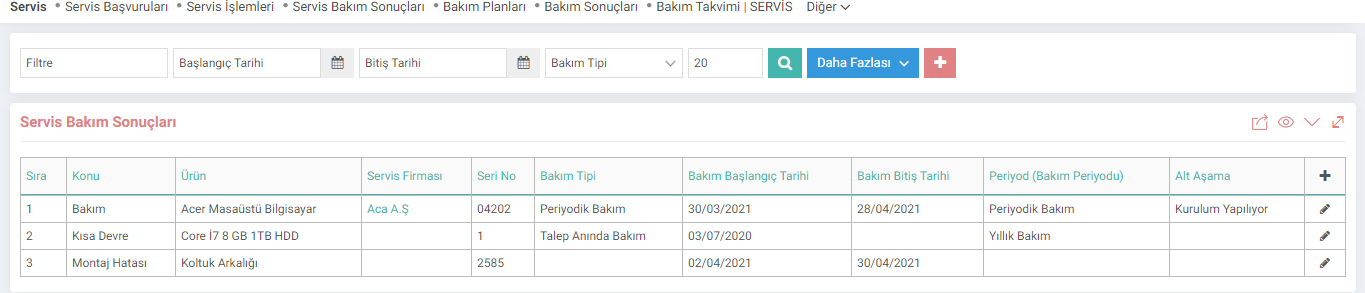
نتائج صيانة الخدمة هي الشاشة التي يتم فيها تسجيل وفحص نتائج تطبيقات الخدمة المدخلة. يمكنك الوصول إلى صفحة نتائج الصيانة من المسار الموضح أدناه. ويمكن أيضًا إدخال نتائج الصيانة ضمن تطبيق الخدمة.
PATH: CRM > Service-Warranty > Service > Maintenance Results
يمكنك إدراج وتحديث نتائج الصيانة المحفوظة من هذه الصفحة أو حفظ نتيجة صيانة جديدة من خلال النقر على أيقونة "+".
 تصحيح
تصحيح 3- الرقم التسلسلي: يتم إدخال الرقم التسلسلي للمنتج.
4- شركة الخدمة: إذا لم يتم إجراء الصيانة داخل الشركة، يتم اختيار شركة الخدمة.
5 - شخص الخدمة: يأتي تلقائيًا حسب شركة الخدمة المحددة.
6- الخدمة الموظف: يتم اختيار الموظف الذي سيشارك في صيانة المنتج.
7-موظف الخدمة 2:يتم اختيار الموظف الآخر الذي سيشارك في صيانة المنتج.
8-تاريخ بدء الصيانة:يتم إدخال تاريخ دخول المنتج للصيانة.
9-تاريخ انتهاء الصيانة: تاريخ الانتهاء من الصيانة.
10- الوصف: يتم كتابة وصف للمنتج الذي تم إدخاله نتيجة الصيانة.
11- نوع الصيانة: يتم اختيار نوع الصيانة من هذا الحقل. يتم تعريف أنواع الصيانة في لوحة التحكم > النظام > المعلمات.
12-المرحلة الفرعية: يتم تحديد المرحلة الفرعية للخدمة. يتم تعريف المراحل الفرعية في المعلمات.
13-مستند الدعم: في هذا الحقل، تتم إضافة مستند الضمان/الدعم المتعلق بنتيجة الصيانة.
ثم تقوم بإدخال نتيجة الصيانة بالضغط على زر "حفظ". للتحديث، ما عليك سوى النقر على أيقونة "التحديث" في نهاية السطر بعد إدراجها في شاشة نتيجة الصيانة. الشاشة التي تفتح هي نفس شاشة التسجيل. يمكنك تحديثه عن طريق إجراء التغييرات اللازمة.

Servis Bakım Planları ve Servis Bakım Sonuçlarında kullanılmak üzere bakım tipleri tanımlanır.
Feedback
4.3.2.1.1. Service Applications
Service management; maintenance, repair, technical support, etc. regarding after-sales products and services. It covers the processes. With the Workcube Service Module, you can see which type of service was provided to which customers regarding which product or solution, which service ended in what situation, etc. You can control the situations.
4.3.2.1. Service-Warranty Parametric Definitions
Service management; maintenance, repair, technical support, etc. regarding after-sales products and services. It covers the processes. With the Workcube Service Module, you can see which type of service was provided to which customers regarding which product or solution, which service ended in what situation, etc. You can control the situations.
Service Management
Workcube Service Management; By providing a complete and end-to-end solution for all your processes, from work orders, materials and asset management to contracts, from warranty tracking to invoicing, it ensures that you or your partners to whom you direct services provide timely and consistent service to their customers.
4.3.2.1.3. Service Maintenance Results
Service Maintenance Results is the screen where the results of entered service applications are recorded and checked. You can access the maintenance result page from the path shown below. Maintenance results can also be entered within the service application.
Service-Warranty Management
Workcube Service and Warranty Management Module offers a reliable and effective solution to service and support experts in the stages of accepting, monitoring, directing and analyzing customers' service and support requests.