CRM Agenda
Workcube has a user-specific home page structure. The first thing that greets the user when logging into the Workcube system is the "Agenda" page. The agenda page allows us to see every item we add as widgets when we first enter the home page. Due to the structure of the agenda page, there are Widget-Boxes side by side and one above the other. It is moved "top, bottom, right, left" as desired by drag and drop method.
Path: Control Panel > Settings > Agenda
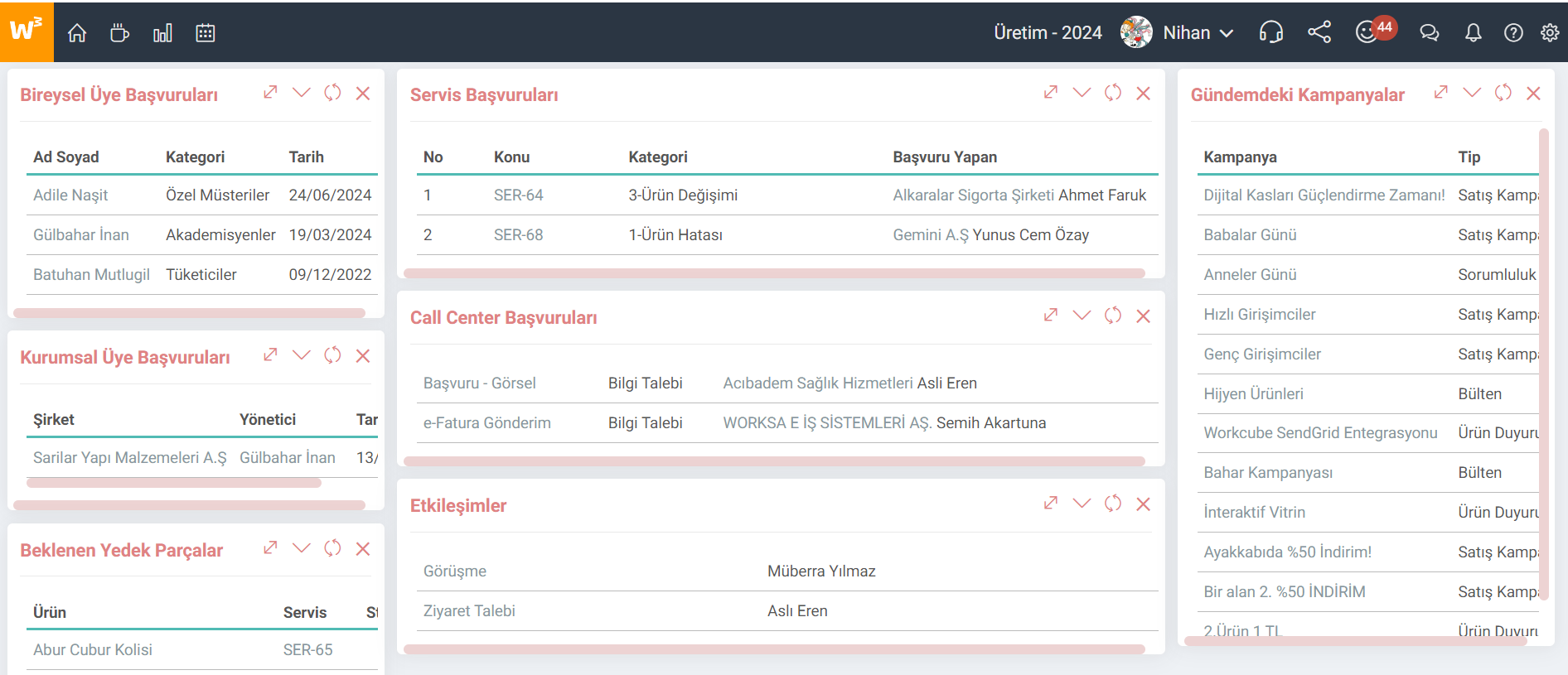
Individual Member Applications
Customers / Suppliers whose potential box is checked in Individual Accounts are listed. Name Surname, Category and Date columns appear. It comes with 20 records and works in a pagination format. Customers/Suppliers are listed according to the registration date, from newest to oldest.
Corporate Member Applications
Customers/Suppliers with the potential box checked in Corporate Accounts are listed. Company Title, Manager and Date columns appear. It comes with 20 records and works in a pagination format. Customers/Suppliers are listed according to the registration date, from newest to oldest.
Expected Spare Parts
Widget-Box that lists the spare parts requested to be used in a service operation. In Service Applications, in the "Product Service Transactions" field, the lines with the "Description / Product" field filled are listed according to the registration date, from newest to oldest. “Expected Spare Parts” are recorded and listed using the “Product, Service, Stock” parameters. The number of rows varies depending on the "Listing Maximum Number of Records" field.
Service Applications
Widget-Box where service applications registered or updated during the day are listed. It works in pagination format and there are ten service application records per page. The most current service record appears at the top.
Call Center Applications
Widget-Box where the user is selected as the responsible person in the application detail and the call center applications recorded or updated during the day are listed. It works in pagination format and there are ten service application records per page. The most recent service record appears at the top.
Interactions
Widget-Box that lists the interactions recorded or updated during the day. It works in pagination format, with ten interaction records per page. The most recent interaction record appears at the top.
Current Campaigns
Current Campaigns is a Widget-Box that lists active campaigns regardless of date. It works to list the last 15 campaigns and there is no pagination. Campaign, Type, Start Date and End Date columns appear.