Incoming Money Transfer
Incoming Money Transfer is one of the basic financial transactions that ensures that money transfers (Money Transfer, EFT, FAST, etc.) made by customers or third parties to your business's bank accounts are recorded in the system accurately and on time. Incoming Transfer is the subject of bank transactions to the money transferred by customers or debtors to your business's bank accounts in return for goods/service purchases, advance payments or other financial obligations. A recorded incoming remittance document; It reduces the current account's debit balance and creates a credit record. The incoming transfer also increases the current balance of the selected bank account. It automatically assigns offset slip records to the relevant bank and current account codes (Ex: 102 Banks Debit / 120 Recipients Credit) on the general ledger side.
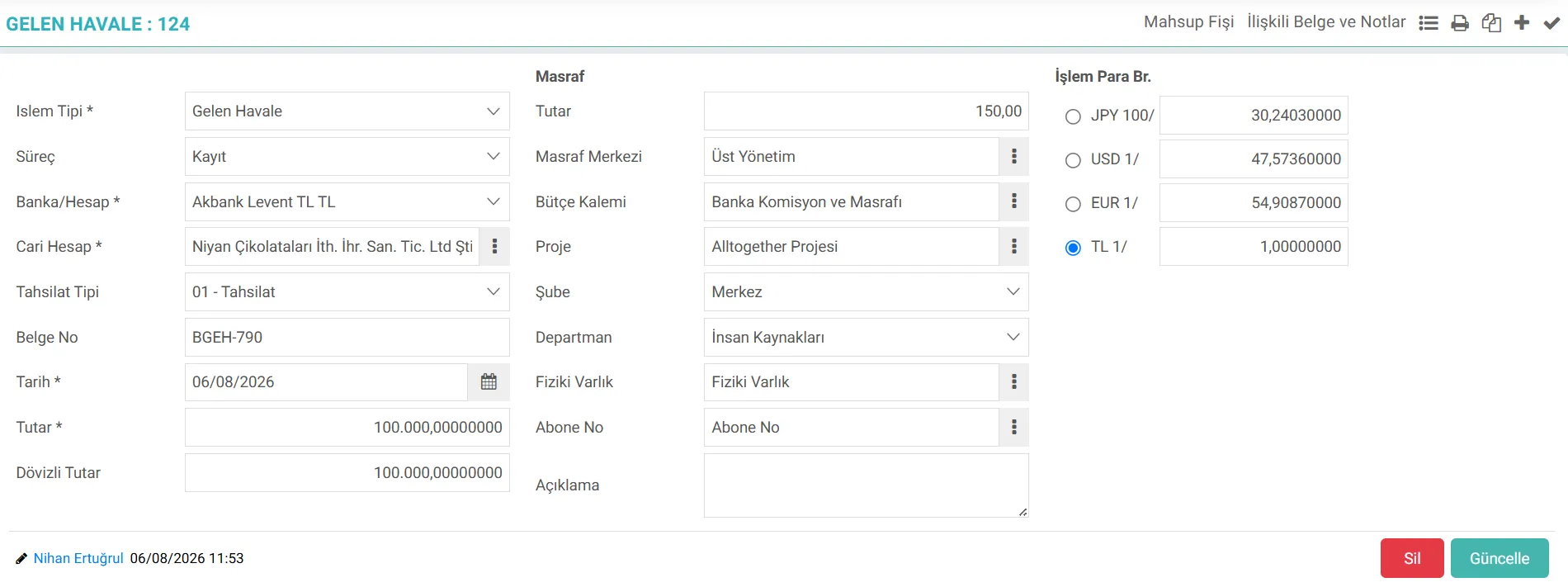
What is Workcube Incoming Transfer?
- Current Account Management: It ensures that the incoming amount is instantly reflected as a debit/credit record in the current account of the relevant company, individual consumer or personnel.
- Finance and General Accounting: Creates automatic accounting vouchers with a single click, according to the rules defined in the transaction category, and produces records in accordance with VUK and e-Ledger standards.
- Budget and Expense Management: It ensures that commissions and expenses incurred during bank transfer are directly associated with budget items and cost centers.
- Project Management:Supports the inclusion of income in project profitability analyzes by directly associating it with a specific project.
- IK / Employee Portal:Enables tracking of transactions such as personnel advance closings or salary refunds through HR accounting codes.
Incoming Remittance for a Business Importance
Keeping timely, accurate and complete incoming transfer records is critical for corporate finance management:
- Real-Time Cash Flow Tracking: It provides instant and accurate monitoring of the available cash status in the bank accounts of the business.
- Risk and Credit Limit Management: As collections from customers are entered into the system, the customer's risk limit is opened; Thus, clogging of new order and shipment processes is prevented.
- Current Reconciliation Ease: It eliminates the risk of incompatibility in end-of-period current account reconciliations by ensuring that customer account statements are kept up-to-date.
- Open Invoice Closing and Aging Analysis: The invoice against which the collection is made is matched in the invoice closing processes to ensure that receivable aging and maturity reports give accurate results.
- Finance-Accounting Integration: It alleviates the burden of manual accounting records, reduces human errors and keeps financial statements (Balance Sheet, Cash Flow Statement) up to date.
Process Flow / Life Cycle in Workcube
From entering the incoming transfer transaction to the system, accounting and The process flow until the document closing stage is detailed in the table below:
Stage | Module / Document | Description |
|---|---|---|
1. Bank Notification and Instruction Control | Bank Integration / Bank Instruction | Upon notification from bank APIs or statements, it is checked whether there is a pending Incoming Bank Instruction. If available, the system calls the instruction automatically. |
2. Data Entry and Current Matching | Finance / Incoming Transfer | Incoming transfer is opened; Transaction Type, Bank Account and relevant Current Account are selected. In batch operations, rows are added. |
3. Currency, Expense and Project Assignments | Finance / Expense / Project | The currency and rate of the transaction are entered. Bank commission deduction, if any, is linked to the cost center and the relevant budget item. If the income belongs to a project, the project code is selected. |
4. Posting and Integration Triggering | Bank / Current / Accounting Queries | When saved, it records credit in the current transaction table and automatically creates the accounting voucher. |
5. Document Closing (Optional) | Finance / Current Document Closing | If document closing is being done the system matches the incoming transfer directly with open sales invoices or payment requests and displays the closing screen. triggers. |
6. Approval and End of Life Cycle | Process Management / e-Ledger | The document is locked after going through defined approval processes. At the end of the period, the process is completed by including it in the e-Ledger and trial balance reports. |
What Should Be Considered When Managing Incoming Transfer Transactions?
A. Accounting Codes of Current Accounts must be Complete
If the transaction category is making an accounting transaction, the accounting account code of the selected current for the relevant period must be defined in the system. Otherwise, the recording process will be interrupted since the accounting voucher cannot be issued.
B. Risk of Double Recording with Bank Instructions
If there is an incoming transfer order previously entered into the system, this instruction must be associated when creating the transfer record. If an independent transfer is entered, the bank order remains open and the risk of double balance occurs.
C.Bank Account and Currency Type
The correct bank and branch account where the transaction takes place must be selected. If the transaction is in foreign currency (USD, EUR, etc.), the currency type in which the recording is made and the CBRT exchange rate on the date of the transaction should be checked. If a task related to exchange rate information is added in the Robotic Tasks field, the robot will work regularly every day and the exchange rates will be automatically withdrawn from the Central Bank.
D.Legal Legislation and Exchange Rate Difference
According to VUK, foreign currency transactions are accounted for in local currency. Integrating the exchange rate entries with the CBRT daily rates and printing the exchange rate information on the voucher line detail ensures that you do not receive errors in e-Ledger audits.
Bulk Incoming Transfer
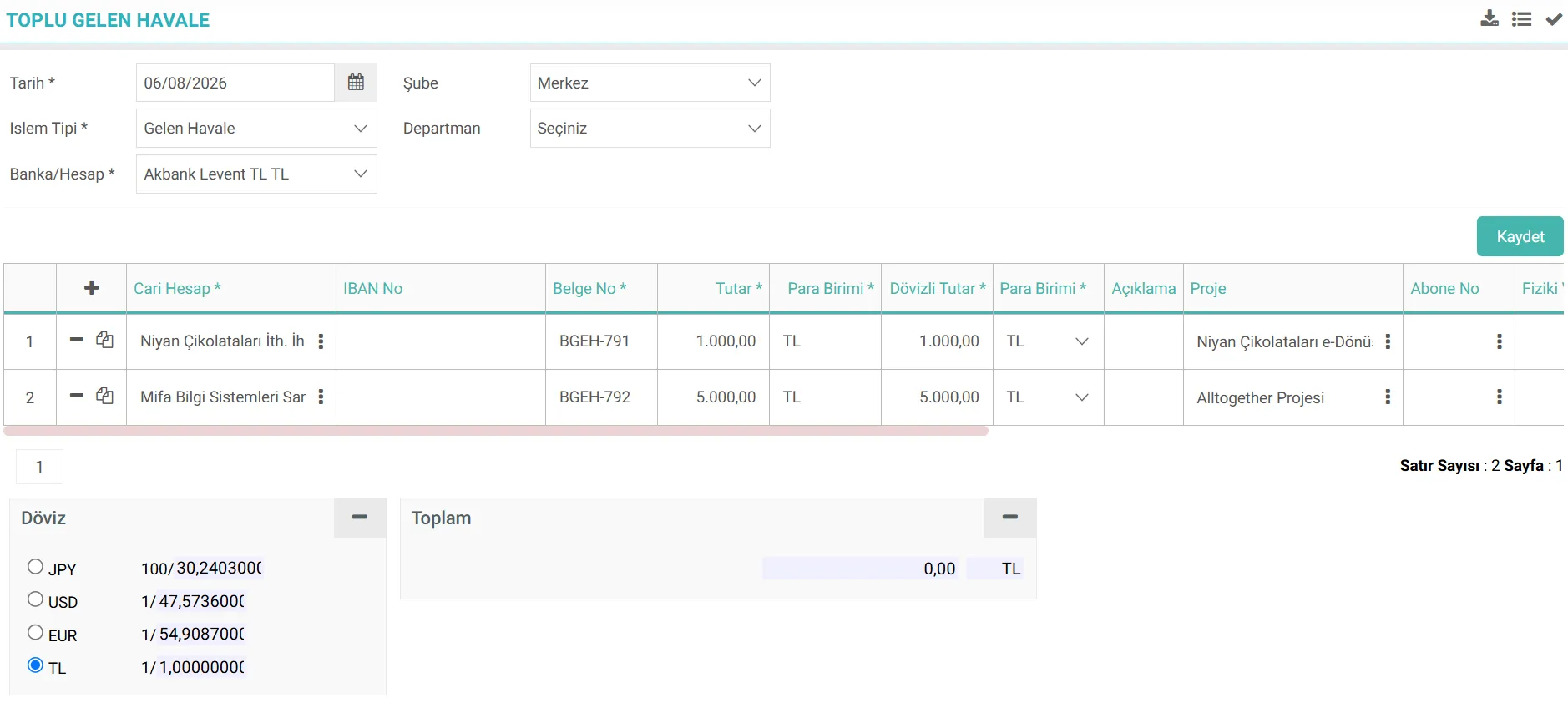
Incoming Transfer transaction can be entered individually or in bulk. Transfers from different clients during the day can be collected in a single record on a daily basis. Data can be entered into these lines one by one, or it can be added by preparing a file with CSV Import on the bulk incoming transfer registration page. After the document is saved, separate accounting and current transactions will be created for each current account entered in the document.

Bu sayfanin cf_big_list_search'ü olusturulmustur.
Kaydedilen belgelerin çıktılarının alınması için kullanılır. Standart şablonlar seçilebilir ya da özel şablonlar eklenebilir, ayrıca şablonlar yetkiye bağlanabilir.
Mevcut banka hesaplarını toplu olarak sisteme aktarmak için kullanılır.
Workcube üzerinde banka hesapları tanımlandıktan sonra sistemde bankalar açılır ve ilgili kayıtlarda seçilir. Bu sayede banka hesaplarında bakiyeler takip edilir.
xml_is_upd_import_file Dosya Import ile Kaydedilen Belgeler Güncellenebilsin
xml_money_type Kur Tipi
xml_process_stage Süreç Gösterilsin mi?
x_select_branch Şube Seçilebilsin
Feedback
Incoming Transfer Rounding
Added/Edited Function:ERP > Finance Accounting > Bank > "Rounding Number of Amounts in the Amount Field" has been added to the Incoming Transfer XML settings.
Usage: The number of digits after the comma must be selected in the provided.