Production Requests
In Workcube, you can create an unlimited number of demands by associating them with orders, stations, and products in order to produce the product or products you want and convert them into production orders.
Path: ERP > Production > Production Planning > Production Requests
You can create a material requirement list in bulk and send it to production in bulk, as well as create a material requirement list by selecting the desired request from the listing screens. You can also send it directly to production. When you do this, a production order will automatically be opened.
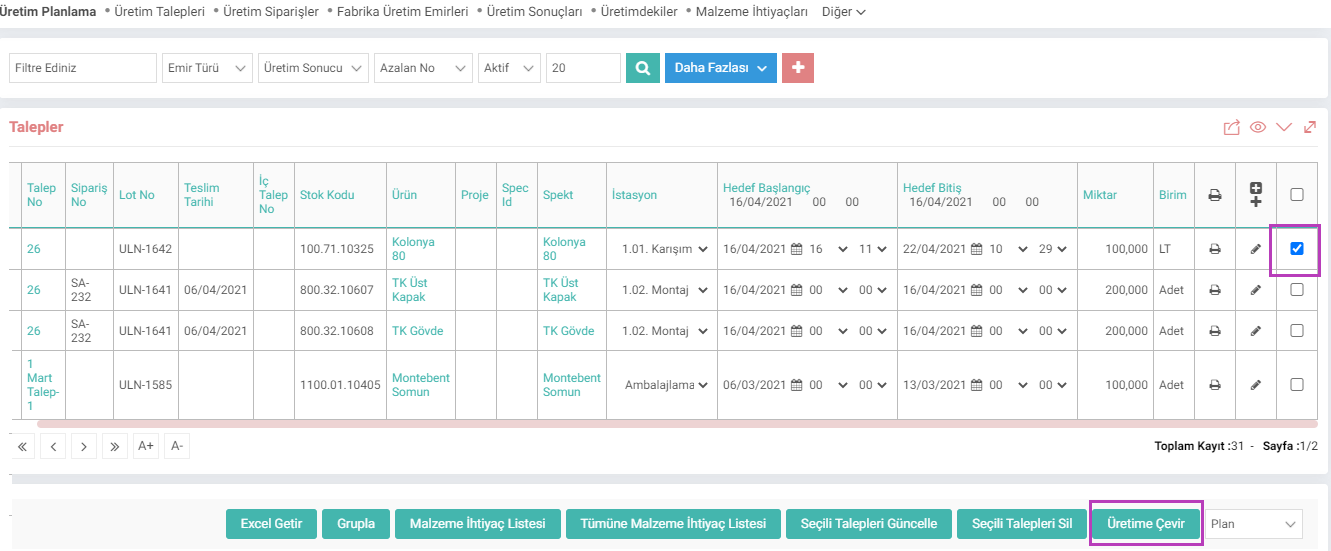
You can also select and delete and update the relevant demands, go to material requirement lists, download Excel and group by clicking the "Group" button. When you click Group, the following section will open at the bottom of the page;
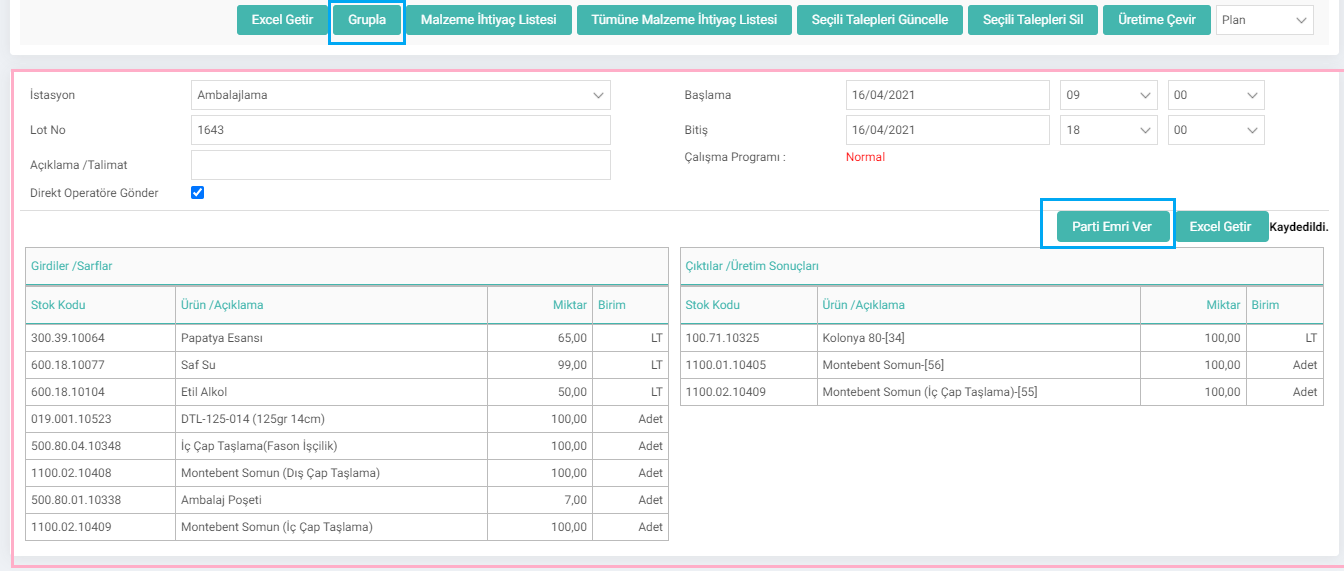
Note: You can change the Production Requests page depending on XML.
On the Production Requests page:
Production start/end date
How many units product
Project
Job
It can control the production to be made within the order.
Creating a Production Request
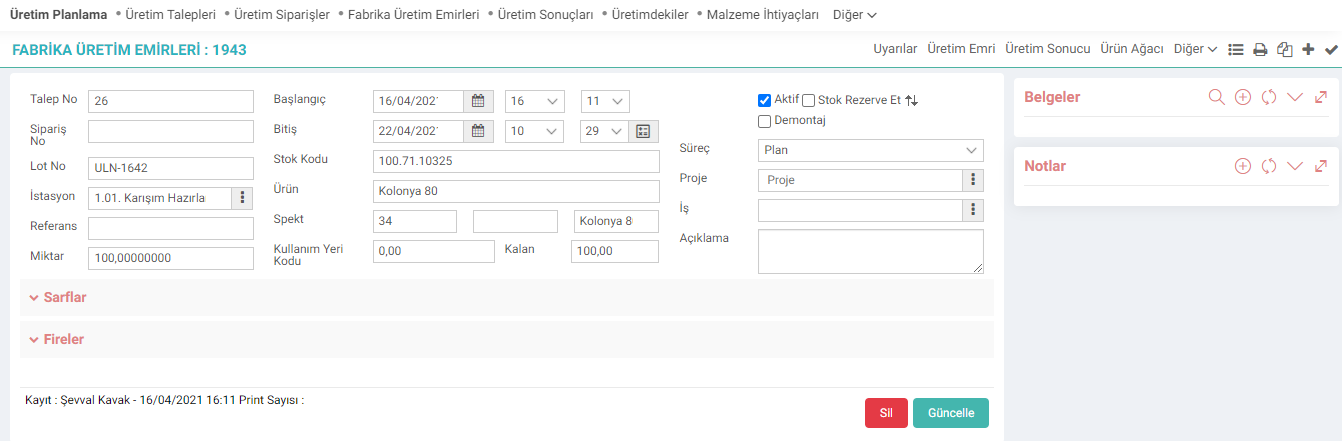
You can create a new request by clicking the "+" icon on the Production Requests page. By clicking on the request details button, you can view the tree of the product you have selected and also see the total unit requirement and stocks required for production. From this field, the system allows opening a work order for all levels in the main product.

If you have specified an alternative station, you can change the selection in the "Station" field.
If Continuous is selected in the Work Type field, it will perform the relevant work order on the relevant date without dividing it. If partial is selected, it will be done by dividing.
Disassembly: If this box is checked, the consumption components will enter the stock and the main product will be removed from the stock.
When you click on the save button, a production request is created. Production orders can then be placed from the details or production requests page.
What is the Difference Between Production Requisition and Production Order?
When you create a production request, unlike a production order, the system does not reserve the product you want to produce and the materials you will consume. It has no effect on the stock account that can be sold. However, we can issue the order after we run the material requirement to them as an internal production request and complete the supply process. Or, we can make changes to orders with material constraints, provide material updates in the relevant orders, and then publish the production order.
It is one of the first steps in the production created for the customer order or stock. While a production request can be created based on a sales order, the business can also use the production request page to produce products for its own stock.

Ürün veya ürünlerin üretilmesi ve üretim emrine dönüştürülmesi için sipariş, istasyon, ürünle ilişkilendirerek talepler oluşturulur.
Ürün veya ürünlerin üretilmesi ve üretim emrine dönüştürülmesi için sipariş, istasyon, ürünle ilişkilendirerek talepler oluşturulur.
İş süreçlerinin tasarım ve akışlarını oluşturur.
Kaydedilen belgelerin çıktılarının alınması için kullanılır. Standart şablonlar seçilebilir ya da özel şablonlar eklenebilir, ayrıca şablonlar yetkiye bağlanabilir.
is_spec_code Spec Göster
is_show_lot_no Lot No Gösterilsin mi?
is_show_production_station Üretim Aşaması Gösterilsin mi?
is_show_process Aşama Gösterilsin mi?
is_upd_related_demands İlişkili Üretim Taleplerinin Miktarları Güncellensin mi?
is_show_spec_no Spec Alanında Gösterilecek Bilgi
is_show_multi_print Toplu Print Yapılsın mı?
is_show_order_no Sipariş No Gösterilsin mi?
is_show_detail Açıklama Gösterilsin mi?
is_show_project Proje Gösterilsin mi?
is_show_temp_date Hedef Başlangıç Ve Hedef Bitiş Tarihleri Gösterilsin mi?
is_show_demand_no_ İlişkili İç Talep Numarası Gösterilsin mi?
is_workstation_order_ İstasyon Filtresi
Feedback
Production Requests
Edited Function:The situation in adding a mass production request from the ERP > Production > Production Planning > Production Requests listing page has been adjusted.