Produktionsanfragen
In Workcube können Sie eine unbegrenzte Anzahl von Anfragen erstellen, indem Sie sie mit Aufträgen, Stationen und Produkten verknüpfen, um das oder die gewünschten Produkte herzustellen und sie in Produktionsaufträge umzuwandeln.
Pfad: ERP > Produktion > Produktionsplanung > Produktionsanfragen
Sie können eine Materialbedarfsliste in großen Mengen erstellen und an die Produktion senden in großen Mengen verarbeiten und eine Materialanforderungsliste erstellen, indem Sie die gewünschte Anforderung auf den Listenbildschirmen auswählen. Sie können es auch direkt an die Produktion senden. Wenn Sie dies tun, wird automatisch ein Produktionsauftrag geöffnet.
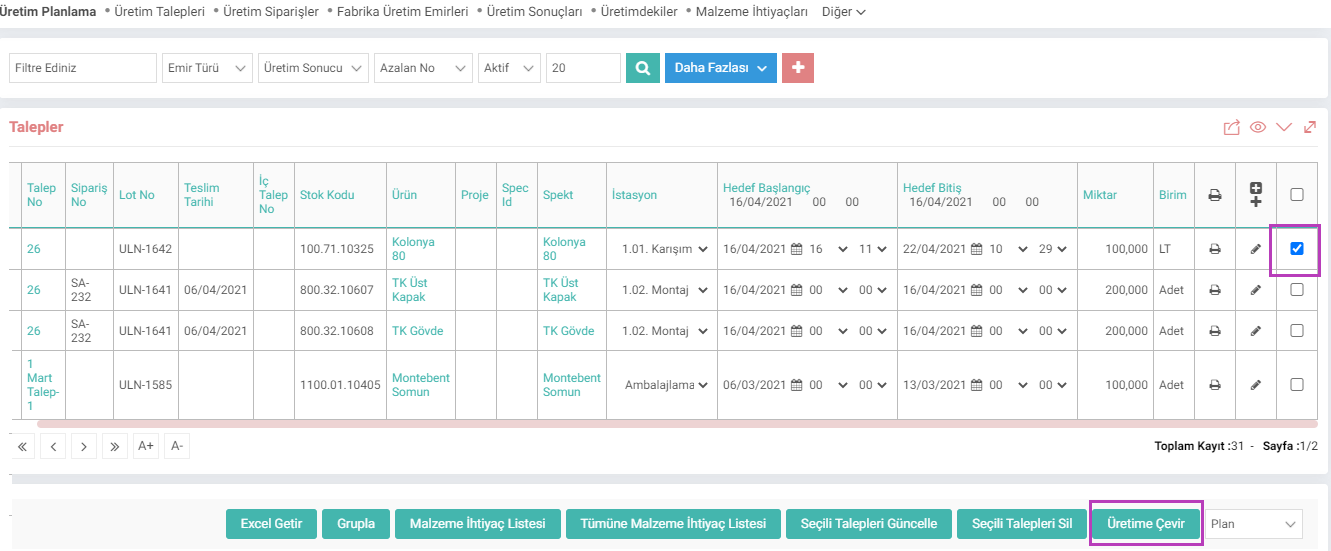
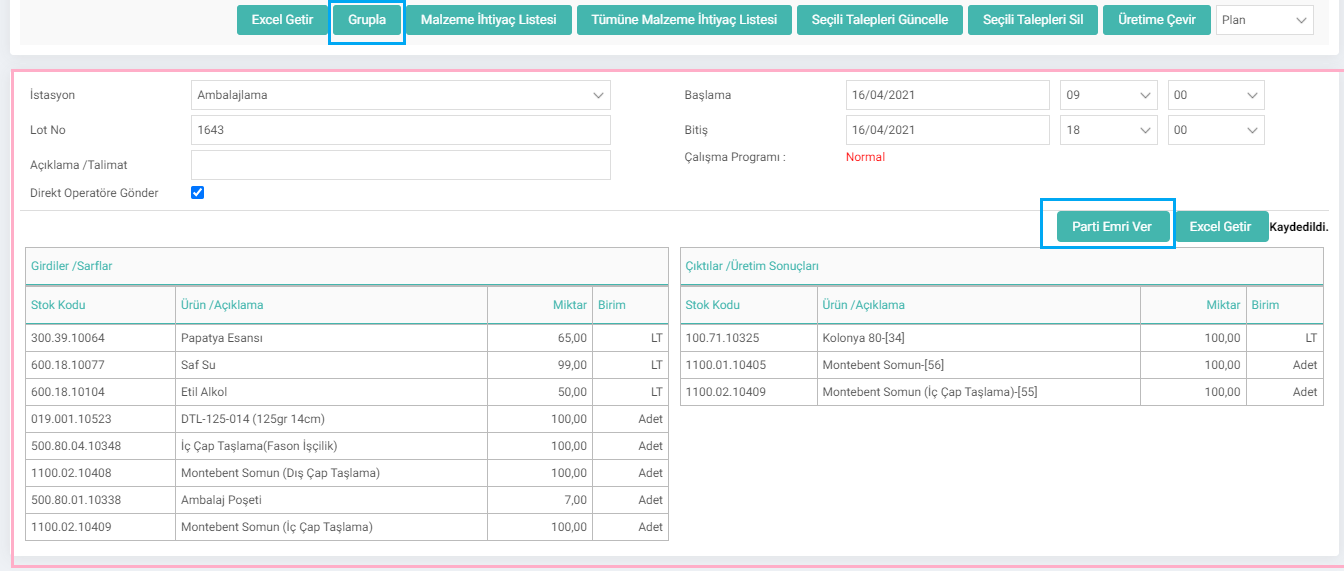
Sie können auch die relevanten Bedarfe auswählen und löschen, aktualisieren, zu den Materialbedarfslisten gehen, Excel herunterladen und sie gruppieren, indem Sie auf die Schaltfläche „Gruppieren“ klicken. Wenn Sie auf „Gruppe“ klicken, wird unten auf der Seite der folgende Abschnitt geöffnet:
Hinweis: Sie können die Seite „Produktionsanfragen“ je nach XML ändern.
Auf der Seite „Produktionsanfragen“:
Produktionsstart/-ende Datum
Wie viele Einheiten produzieren
Projekt
Auftrag
Es kann die innerhalb der Bestellung auszuführende Produktion steuern.
Eine Produktion erstellen Anfrage
Sie können eine neue Anfrage erstellen, indem Sie auf der Seite „Produktionsanfragen“ auf das Symbol „+“ klicken. Durch Klicken auf die Schaltfläche „Details anfordern“ können Sie den Baum des von Ihnen ausgewählten Produkts anzeigen und außerdem den gesamten Stückbedarf und die für die Produktion erforderlichen Bestände einsehen. Von diesem Feld aus ermöglicht das System das Öffnen eines Arbeitsauftrags für alle Ebenen im Hauptprodukt.

Wenn Sie eine alternative Station angegeben haben, können Sie die Auswahl im Feld „Station“ ändern.
Wenn Kontinuierlich im Feld „Arbeitstyp“ ausgewählt ist, Es führt den entsprechenden Arbeitsauftrag zum entsprechenden Datum aus, ohne ihn aufzuteilen. Wenn Teilweise ausgewählt ist, erfolgt dies durch Teilung.
Demontage: Wenn dieses Kontrollkästchen aktiviert ist, werden die Verbrauchskomponenten in den Lagerbestand aufgenommen und das Hauptprodukt aus dem Lagerbestand entfernt.
Wenn Sie auf die Schaltfläche „Speichern“ klicken, wird eine Produktionsanforderung erstellt. Produktionsaufträge können dann über die Seite „Details“ oder „Produktionsanfragen“ aufgegeben werden.
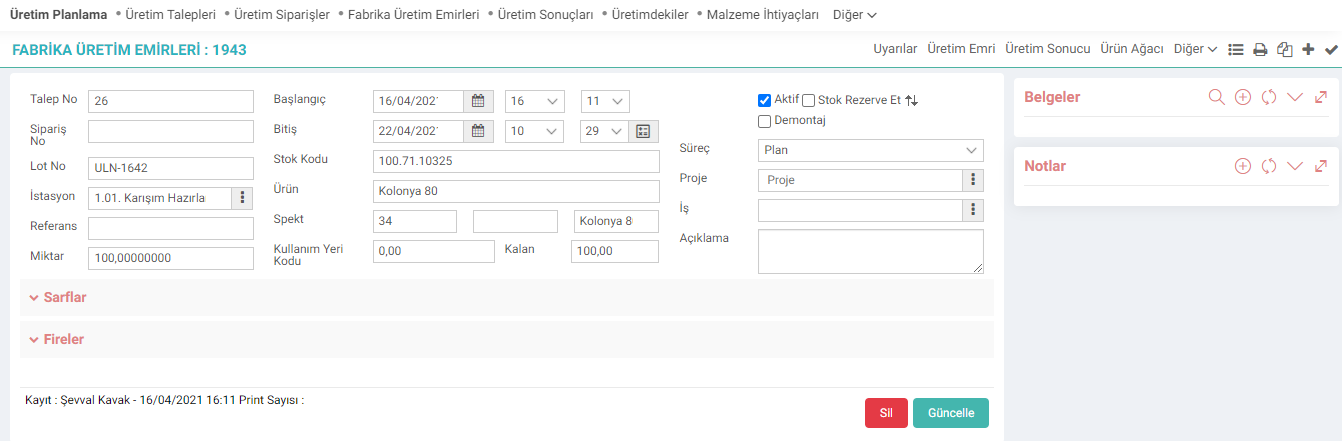
Was ist der Unterschied zwischen Produktionsanforderung und Produktionsauftrag?
Wenn Sie eine Produktionsanforderung erstellen, reserviert das System im Gegensatz zu einem Produktionsauftrag nicht das Produkt, das Sie produzieren möchten, und die Materialien, die Sie verbrauchen werden. Es hat keine Auswirkung auf das Aktienkonto, das verkauft werden kann. Wir können den Materialbedarf jedoch als interne Produktionsanfrage an ihn weiterleiten und die Bestellung nach Abschluss des Lieferprozesses erteilen. Oder wir können Änderungen an Aufträgen mit Materialbeschränkungen vornehmen, Materialaktualisierungen in den relevanten Aufträgen bereitstellen und dann den Produktionsauftrag veröffentlichen.
Dies ist einer der ersten Schritte bei der Erstellung der Produktion für einen Kundenauftrag oder einen Lagerbestand. Während eine Produktionsanforderung auf der Grundlage eines Kundenauftrags erstellt werden kann, kann das Unternehmen die Produktionsanforderungsseite auch verwenden, um Produkte für seinen eigenen Lagerbestand zu produzieren.

Ürün veya ürünlerin üretilmesi ve üretim emrine dönüştürülmesi için sipariş, istasyon, ürünle ilişkilendirerek talepler oluşturulur.
Ürün veya ürünlerin üretilmesi ve üretim emrine dönüştürülmesi için sipariş, istasyon, ürünle ilişkilendirerek talepler oluşturulur.
İş süreçlerinin tasarım ve akışlarını oluşturur.
Kaydedilen belgelerin çıktılarının alınması için kullanılır. Standart şablonlar seçilebilir ya da özel şablonlar eklenebilir, ayrıca şablonlar yetkiye bağlanabilir.
is_spec_code Spec Göster
is_show_lot_no Lot No Gösterilsin mi?
is_show_production_station Üretim Aşaması Gösterilsin mi?
is_show_process Aşama Gösterilsin mi?
is_upd_related_demands İlişkili Üretim Taleplerinin Miktarları Güncellensin mi?
is_show_spec_no Spec Alanında Gösterilecek Bilgi
is_show_multi_print Toplu Print Yapılsın mı?
is_show_order_no Sipariş No Gösterilsin mi?
is_show_detail Açıklama Gösterilsin mi?
is_show_project Proje Gösterilsin mi?
is_show_temp_date Hedef Başlangıç Ve Hedef Bitiş Tarihleri Gösterilsin mi?
is_show_demand_no_ İlişkili İç Talep Numarası Gösterilsin mi?
is_workstation_order_ İstasyon Filtresi
?
2.3.2.2. Produktionsplanungsprozesse und Prozesskategorien
To ensure correct functioning in the Production Planning module, processes and process categories must be defined correctly.
Production Planning
Production Planning Module is an integrated solution that reduces planning time and can easily respond to changes in the supply chain. It improves your company's speed of response to customer demands and offers decision support to planners.
2.3.1.1. Production Design Parametric Definitions
Many parametric definitions such as your workstations, operation types, work programs, pause types, product trees, product features, quality achievements are made from the Production Design module.
Production Requests
Edited Function:The situation in adding a mass production request from the ERP > Production > Production Planning > Production Requests listing page has been adjusted.