Self Service Other Transactions
In the Self Service Other Transactions application, many requests such as purchasing, internal request, payment, personnel, travel, budget transfer can be made. Correspondence and approvals are displayed and the request is approved or rejected.
Path: Intranet > Other Transactions
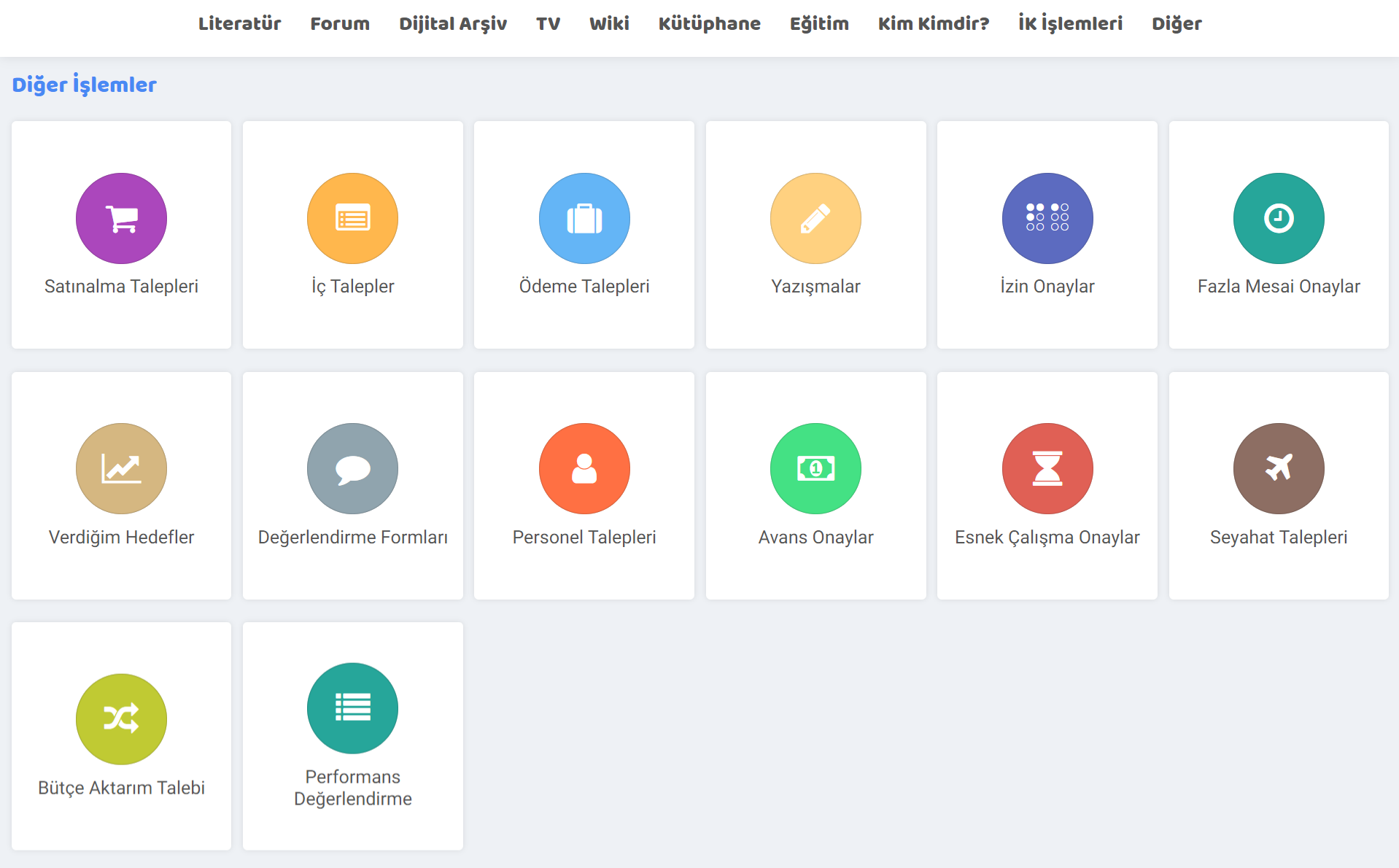
- Purchase Requests: Purchase requests are made with purchase requests, but also the status. Current purchase requests can also be viewed. This request appears on the administrator's approval screen, and after the approval, the transaction takes place.
- Internal Requests: An internal request can be created within the institution. Example: The request is created and then the Budget - Stock Control process is started, the internal request is approved after the unit approval and manager approval processes. Internal Demand Process stages are not limited to these stages, Stages can be changed by going to the process detail from the Dashboard > BPM > Processes screen.
- Payment Requests: A payment request is made by making selections such as current account, project, request amount, contract and order. After the approval process, the request is made.
- Correspondence: A correspondence record is created by giving details such as subject, details, sent, information given. If a template has been created, this can also be selected so that the text comes automatically. This page can also be accessed from the Contact > Correspondence screen.
- Leave Approvals: On the leave pending approval screen, a list is made according to HR processes. In this list, the list is displayed according to category, name-surname, leave date, day, process/stage and registration detail, and leaves are approved or rejected within the scope of authority.
- Overtime Approvals: Overtime approvals can be approved within the authority according to HR processes on the overtime approval screen, which is similar to the leave approvals screen.
- Goals I Give: In this other process related to the performance module, employees can be given targets in various categories. The performance of the employees is measured according to their ability to achieve these targets.
- Evaluation Forms: After the evaluation form is created, if it is within your authority, the created evaluation form will appear on the approval screen. For more information, you can read the article titled "Assessment Evaluation Forms".
- Personnel Requests: Personnel requests related to the HR module are made from the Other transactions screen. This screen provides many details about personnel requests; Definitions can be made under the requested person characteristics, reasons for need, employee information in the relevant position, other information, opinion and approval sections. Note: Applications are made after this personnel request, and recruitment is carried out as a result of the evaluations.
- Advance Approvals: Requests awaiting approval are listed and can be approved according to HR processes in the "Advance Requesters" and "Advance Requests under Supervision" sections.
- Flexible Working Approvals: Pending Approval. flexible working requests are displayed and can be approved.
- Travel Requests: Travel requests requested and submitted for approval are displayed and can be approved.
- Budget Transfer Request: Budget transfer requests can be viewed and a new budget transfer request can be made by clicking the "+" icon on this screen. When the relevant budget is selected, action is taken regarding that budget.
- Performance Evaluation: On the performance evaluation page, the measurement and evaluation results associated with the employee are displayed and new evaluations can be made.

Çalışanlara toplu fazla mesaileri girmek ve listelemek için kullanılır.
myhome.list_purchasedemand Satınalma Talebi Seçilebilsin
myhome.list_internaldemand İç Talepler Seçilebilsin
myhome.list_payment_actions_demand Ödeme Talepleri Seçilebilsin
myhome.list_correspondence Yazışmalar Seçilebilsin
myhome.my_offtimes_approve İzin Onaylar Seçilebilsin
myhome.extra_times_approve Fazla Mesai Onaylar Seçilebilsin
myhome.my_assign_targets Verdiğim Hedefler Seçilebilsin
myhome.list_detail_survey_approve Değerlendirme Formları Seçilebilsin
myhome.list_personel_requirement_form Personel Talepleri Seçilebilsin
myhome.payment_request_approve Avans Onaylar Seçilebilsin
myhome.flexible_worktime_approve Esnek Çalışma Onaylar Seçilebilsin
myhome.travel_demand_approve Seyahat Talepleri Seçilebilsin
myhome.budget_transfer_demand Bütçe Aktarım Talebi Seçilebilsin
myhome.list_perform Performans Değerlendirme Seçilebilsin
?
3.8.1.1. Meine Mess- und Bewertungsformulare
Mess- und Bewertungsbögen sind Instrumente zur Bewertung der Leistung der Mitarbeiter von Unternehmen, des Fortschritts von Projekten und der allgemeinen Lage des Unternehmens. Diese Formulare können oft unterschiedlicher Art sein, beispielsweise Tests, Umfragen, Beobachtungen oder Interviews. Ausgefüllte Formulare gelangen zur Seite „Messung-Bewertung“ im Modul „HR-Transaktionen“.
Meine flexiblen Arbeitswünsche
Mit Workcube Flexible Working Requests können Mitarbeiter in Ihrer Organisation etwaige Arbeitszeitänderungen mit flexiblen Arbeitszeiten sowie der Möglichkeit, außerhalb der Regelarbeitszeit zu arbeiten, beantragen, steuern und nachverfolgen.
Mein Portal
Die My Portal-Unternehmensfamilie fällt unter Intranet. Über die Module dieser Jobfamilie werden Informationen im Intranet verwaltet und Transaktionen durchgeführt.
Reiseanfragen
Mitarbeiter können Reisen beantragen. Sie können Reiseanträge von Mitarbeitern auf Workcube genehmigen oder ablehnen.
Streitigkeiten über die Lohn- und Gehaltsabrechnung
Wenn Mitarbeiter ihre auf Workcube erstellten Lohn- und Gehaltsabrechnungen einsehen, können sie Einwände gegen die Lohn- und Gehaltsabrechnungen erheben, wenn sie der Meinung sind, dass ein Fehler vorliegt. Gegen den/die widersprechenden Mitarbeiter erfolgt die Beantwortung durch fachkundige Mitarbeiter, die in diesem Bereich befugt sind.